How to plan your week: set aside 30 minutes before the week starts, get every task out of your head, mark the fixed commitments, choose three priorities, give each one a day and a time, then fit the smaller tasks around them. The result is a one-page week where you can see, at a glance, what matters and when it happens.
Here is the 30-minute routine, a sample week, and the mistakes that make weekly plans fall apart.
How to plan your week in 30 minutes

Minutes 0–5: look back
Glance at last week. What got done? What slipped and still matters? Anything left over goes on this week’s list. If you want a fuller version, how to do a weekly review turns this into its own routine that feeds straight into planning.
Minutes 5–10: empty your head
Write down everything on your mind: work tasks, errands, calls, appointments, things you promised people. Don’t sort yet. A printable to-do list is handy for this brain dump, because the lines and tick boxes make a long list easy to scan.
Minutes 10–15: mark the fixed things
Write in what can’t move: meetings, school runs, appointments, classes, birthdays, bin day. These set the shape of each day and show you where the gaps are.
Minutes 15–20: choose three priorities
Ask: if only three things happen this week, which three would make it a good week? Pick them from your list and write them in the priorities box. They might be a work deliverable, a personal task you keep postponing and something for your health or family.
If everything looks urgent, the Eisenhower matrix helps separate what’s important from what’s just loud.
Minutes 20–25: give each priority a slot
A priority without a time is still a wish. Put each one on a specific day, ideally at a time of day when you have energy for it. For bigger tasks, block out the hours on the day itself; time blocking explains how to plan a day by the hour.
Minutes 25–30: fill the gaps
Spread the smaller tasks across the week, no more than a handful per day. Leave some space empty. Anything that doesn’t fit goes in the to-do box for “if there’s time” or moves to next week.
A sample week
Here’s a plan for someone working office hours with a child at school. The three priorities are a report due Thursday, booking a dentist appointment, and exercise three times.
| Day | Fixed | Priority work | Small tasks |
|---|---|---|---|
| Monday | Team meeting 10 am | Report: outline and data (2 hours) | Pay electricity bill |
| Tuesday | School pick-up 3:30 pm | Run before work | Call about dentist |
| Wednesday | Client call 2 pm | Report: first draft (3 hours) | Return parcel |
| Thursday | — | Report: edit and send by noon; run at lunch | Grocery order |
| Friday | Swimming lesson 5 pm | — | Buy birthday card and gift; plan next week |
| Saturday | Birthday party 2 pm | Long walk | — |
| Sunday | — | — | Batch-cook for Monday and Tuesday |
Notice what isn’t there: no day has more than three small tasks, Friday is light on purpose, and the report has time on three separate days instead of one heroic evening.
Choosing a weekly layout

A week-on-a-page layout suits most people, because you see the whole week at once and spot overloaded days before they happen. The weekly planner maker prints two layouts:
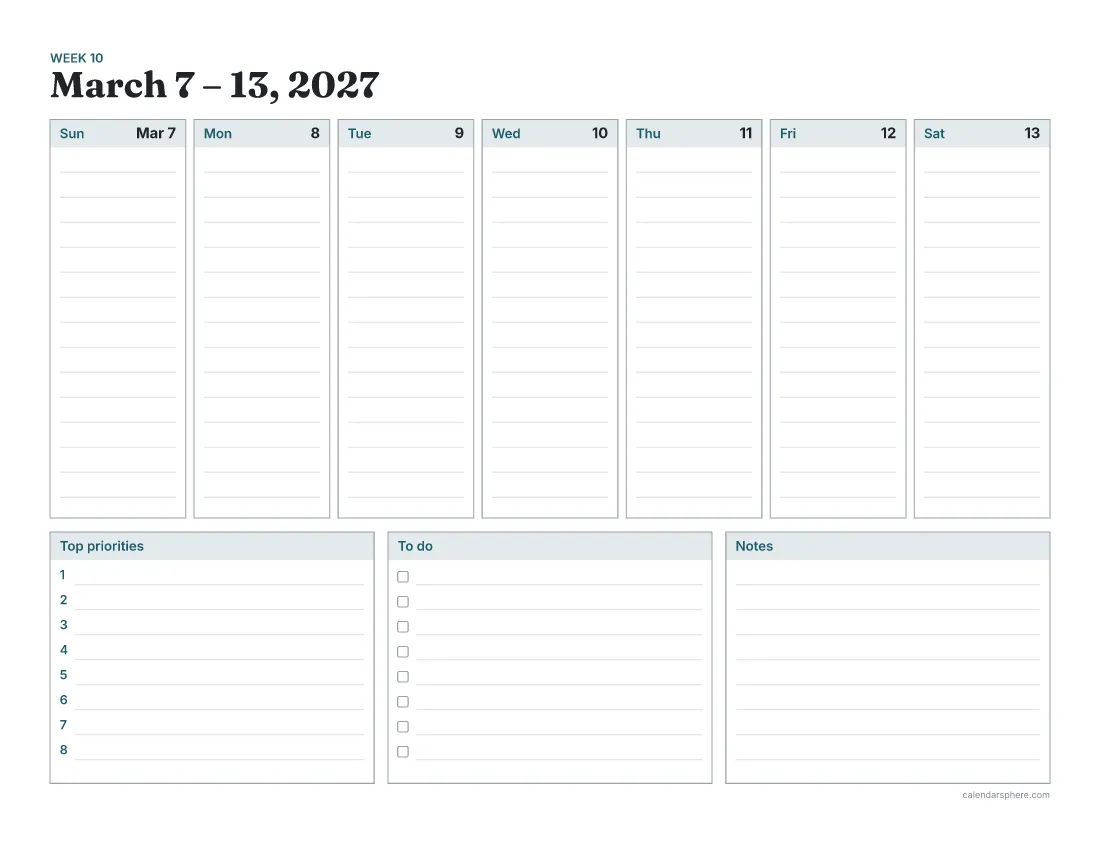
- Landscape: seven day columns across the top, with boxes for top priorities, a to-do list and notes underneath. On Letter paper each day gets 14 writing lines.
- Portrait: the days stacked in two columns of four boxes, with a to-do list in the eighth box.
Weeks can start on Sunday or Monday. Print blank weeks to reuse, or dated pages for up to 52 weeks, each with its ISO week number.
Common mistakes when planning a week
- Planning every hour. A schedule with no slack breaks on Monday morning. Leave gaps.
- Too many priorities. Seven “top” priorities is a to-do list. Keep it to three.
- Ignoring energy. Hard thinking in the post-lunch slump rarely works. Put demanding tasks where you’re sharpest.
- Not looking at the plan. Keep the page where you’ll see it each morning: on your desk, in your bag, on the fridge.
- Treating the plan as a contract. It’s a guide. When something changes, re-plan for five minutes and carry on.
Each day, a two-minute check

Each morning, look at today’s box. Is the priority still the priority? Is there anything to move? Then make the day’s short list. On busy days, a separate daily page with an hourly schedule helps; how to make a to-do list that works covers keeping that list short enough to finish.
Print your week

Pick Sunday or Monday as your start day, choose landscape or portrait, and print a few blank weeks from the weekly planner. Then set a recurring half hour, the same time every week, and plan the next one.
Frequently asked questions
When is the best time to plan the week?
Whenever you can reliably sit down for half an hour before the week starts. Sunday evening and Friday afternoon are popular because the coming week is close but hasn’t begun.
How many priorities should I set for a week?
Three is a good number. It’s few enough that each one gets real time, and if all three are done by Friday the week was a success, whatever else happened.
How full should my weekly plan be?
Leave about a third of your free time unplanned. Something unexpected turns up most weeks, and a plan with no slack collapses at the first surprise.
What’s the difference between planning and reviewing the week?
Reviewing looks back at what got done and what slipped; planning looks forward and decides what happens next. Doing the review first gives the plan better information.
Should I plan my week on paper or on a phone?
Use whatever you’ll look at every day. A printed week on one page shows all seven days at once, which makes overloaded days easy to spot.
What do I do when the plan falls apart midweek?
Take five minutes to re-plan the rest of the week: move what slipped, drop what no longer matters, and protect your top priorities first.