
How to use a habit tracker: write a few small, specific habits down the left, tick the box for each day you do them, and look back at the month to see what stuck. The tracker works because it makes a streak visible and a gap obvious; the habits you choose and where you keep the page matter more than any colour scheme.
This guide covers choosing habits, setting up the page, the daily routine and the monthly review, with a sample tracker you can copy.
How to use a habit tracker, step by step

- Pick three to five habits. More rows are tempting, but a long list on day one is the usual reason people give up by week two. Start small and add rows next month.
- Make each one a yes or a no. “Drink water” is vague; “Fill the bottle twice” is easy to tick. If you can’t say at bedtime whether you did it, rewrite it.
- Set a minimum. Decide in advance what counts on a bad day: one page, five minutes, one glass. Hitting the minimum earns the tick.
- Write the habits in. One per row, in the order you do them during the day, so the page reads like your routine.
- Tick at the same time every day. Tie it to something you already do, such as brushing your teeth at night or your first coffee.
- Total the month. Count the ticks in each row and write the number in the Done column, then decide what to keep, change or drop.
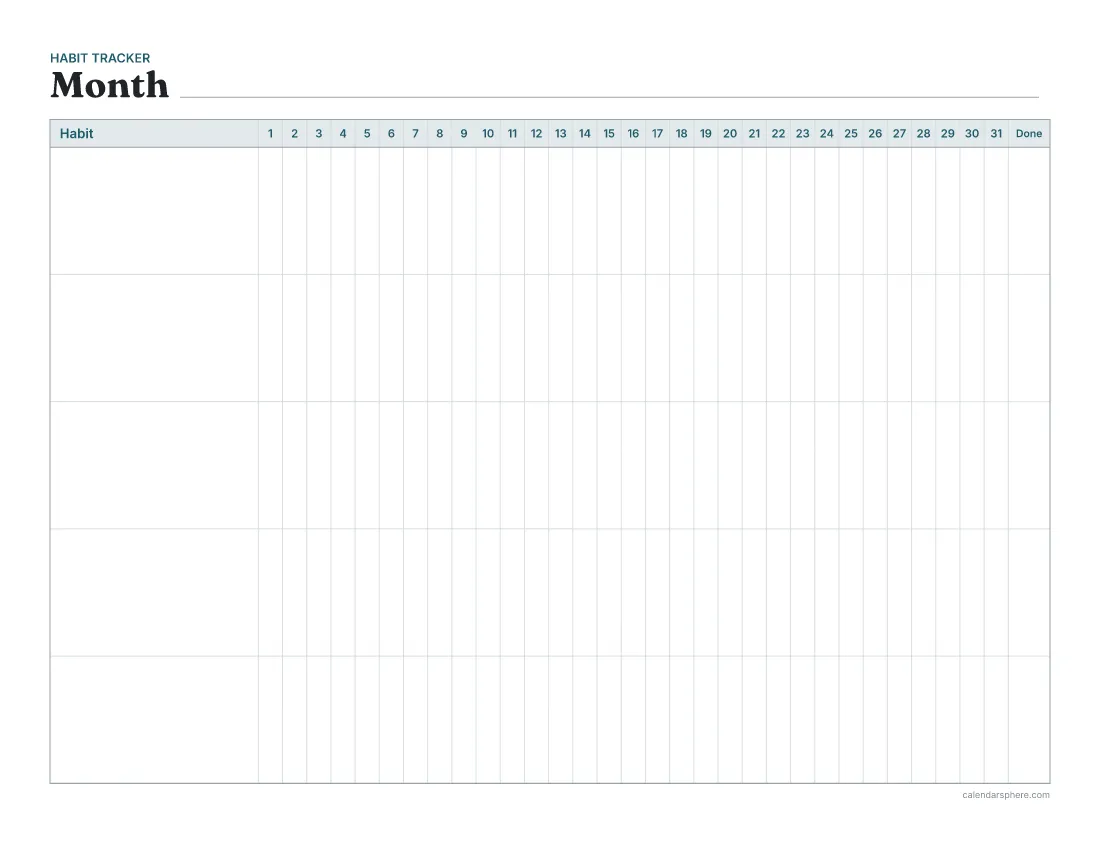
A sample habit tracker


Here is a realistic first month for someone who wants more energy and less screen time. Four habits, each with a minimum:
| Habit | Full version | Minimum that still counts |
|---|---|---|
| Walk | 20 minutes outside | Round the block |
| Read | 10 pages | 1 page |
| Phone out of the bedroom | All night | Charging across the room |
| Plan tomorrow | 5 minutes with a planner | Top 3 tasks on a sticky note |
The last row is a habit that supports the others. A few minutes with a daily planner each evening, writing tomorrow’s top 3 priorities, makes it more likely the walk and the reading get a slot. If you like scheduling by the hour, time blocking shows how to give each habit a fixed time.
Choosing habits that last

Good habits to track share a few traits:
- They happen most days. Daily habits suit a box-per-day grid. For something you do three times a week, track it anyway and aim for three ticks per week rather than a full row.
- They are within your control. “Go to bed by 11” is yours; “sleep eight hours” is partly luck.
- They are small enough to do on a bad day. If the full version only fits on quiet days, the minimum carries you through the busy ones.
- They matter to you this month. A tracker is a short-term tool. Pick the habits you want to build now, not a wish list for the year. For bigger goals, how to plan your year helps you break them into habits you can track month by month.
Habits you want to stop can work too, framed as a positive tick: “No snacks after dinner” or “No phone at the table”. Tick the box on days you managed it.
Where to keep it
A tracker you can’t see is one you forget. Put it where your day passes:
- On the fridge or a door, if your habits happen at home.
- In your planner, as the first page of the month. The habit tracker prints at A5 and Happy Planner Classic sizes as well as Letter and A4, so it fits a ring or disc-bound planner.
- Next to your bed, if most of your habits are morning or evening ones.
Keep a pen with it. The few seconds it takes to find one are enough to skip a tick.
Common mistakes

- Tracking too much. Twelve habits looks ambitious and feels like failure by Wednesday. Five done most days beats twelve done sometimes.
- Vague habits. “Exercise” leaves room to argue with yourself. “10 push-ups” doesn’t.
- Giving up after a miss. A blank box is information, not a verdict. Do the habit the next day. Two misses in a row is the signal to make it smaller.
- Ticking from memory a week later. Back-filling turns the tracker into guesswork. If you missed ticking, leave it blank.
- Never reviewing. The month-end total is where the tracker earns its place. Without it, you only have a page of ticks.
Reviewing your month

At the end of the month, write each row’s total in the Done column and ask three questions:
- Which habits are close to automatic? Keep them, or drop them from the tracker if you no longer need the reminder.
- Which kept slipping? Make them smaller, move them to a better time, or swap them for something you care about more.
- What one habit do I add next month? One at a time keeps the list manageable.
A short weekly check-in helps too: glance at the week’s ticks and fix problems before the month is lost. How to do a weekly review folds this into a 20-minute routine. For children, a reward chart works on the same idea with stickers instead of ticks; see how to use a reward chart.
Blank or dated pages
The habit tracker maker prints either kind:
- Blank months have 31 numbered days, so one page fits any month. Print a few copies and start whenever you like.
- Dated months show the month’s name, the right number of days, the weekday above each day and shaded weekends, which helps if your habits differ on Saturdays and Sundays. You can print 1, 3, 6 or 12 months at once.
Choose 5 to 20 habit rows; fewer rows give each habit more room for its name. Then print, write in your habits and tick the first box tonight.
Frequently asked questions
How many habits should I track at once?
Start with three to five. A short list is easier to keep up every day, and you can add rows next month once the first habits feel automatic.
What counts as a good habit to track?
Something small, specific and yes-or-no, such as “read 10 pages” or “walk 20 minutes”. Vague goals like “be healthier” are hard to tick, so they tend to get skipped.
What should I do when I miss a day?
Leave the box empty and do the habit the next day. One gap is normal; the thing to avoid is two misses in a row turning into a lost week.
Should I tick a box for a partial day?
Decide a minimum version in advance, such as one page instead of ten, and tick the box when you hit it. That keeps the tracker honest without punishing busy days.
Is a paper habit tracker better than an app?
It depends on you. A printed month on the fridge or in your planner is visible without opening anything, and ticking a box by hand takes seconds, which many people find easier to keep up.
How many habits fit on the CalendarSphere habit tracker?
You can choose 5, 8, 10, 12, 15 or 20 rows. Each row has a box for every day of the month and a Done column at the end for the month’s total.